

Concepts
How Spotnote stamps source locations at dev time and reads them back in the browser.
Stamps
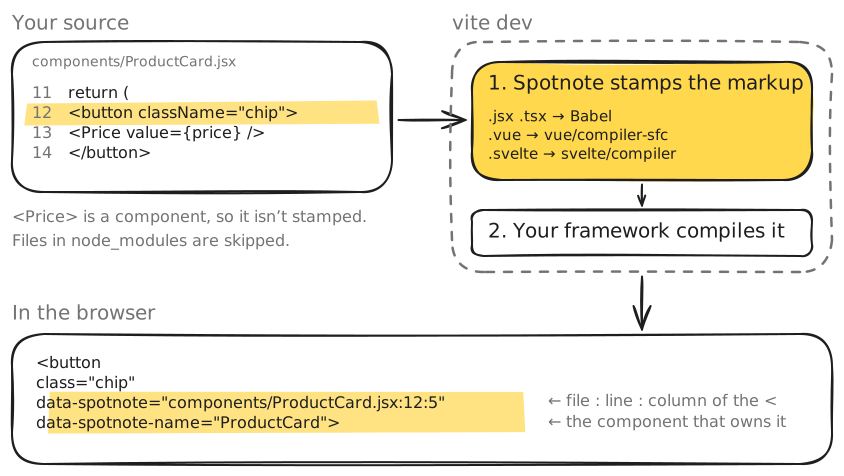
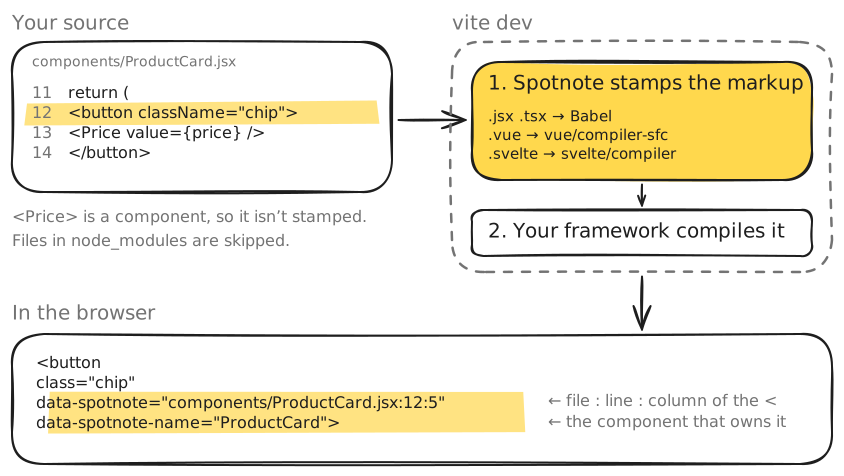
A stamp is a data-spotnote attribute holding the element's source location, relative to your repository's root:
<button data-spotnote="components/ProductCard.jsx:12:5" data-spotnote-name="ProductCard">The location is path:line:column:
pathis relative to the root of the Git repository around your Vite root, with/separators: where your agent works from. In a monorepo, it starts with your app's folder (apps/web/src/App.jsx). Outside a Git repository, it's relative to the Vite root.lineandcolumnboth count from 1, as in your editor.- The position is the start of the opening tag (
<).
The plugin adds it to every host element (a real DOM tag such as <div> or <button>) written in your own source. An element that already has a data-spotnote attribute is left as is.
Components (<ProductCard>) aren't stamped, because a component doesn't always pass attributes down to a DOM node. Their elements are stamped inside their own file instead.
How the stamp is added depends on the file type:
.jsx/.tsx: a Babel pass over the JSX. It doesn't depend on React, so Solid and other JSX frameworks get the same stamps..vue: the template is parsed with your app's ownvue/compiler-sfc..svelte: the markup is parsed with your app's ownsvelte/compiler..astro: the markup is parsed with your app's own Astro compiler.
The stamping runs before your framework's compiler, wherever spotnote() sits in plugins. Files in node_modules are never stamped.
Alongside the location, data-spotnote-name records the owning component. The client uses it to build the source path.
| File | Value |
|---|---|
.jsx / .tsx | The nearest enclosing function whose name starts with a capital letter (function TodoList, const TodoList = () =>, also through memo() / forwardRef()). Omitted when there is none. |
.vue / .svelte / .astro | The file name without its extension. |
The client
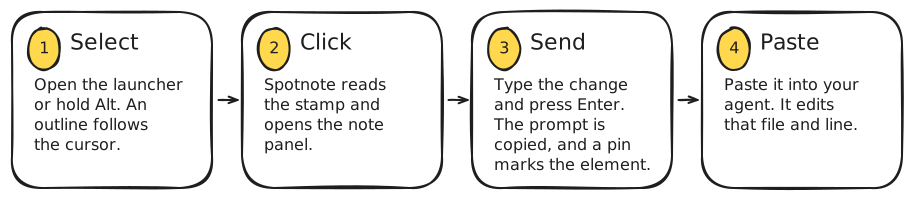
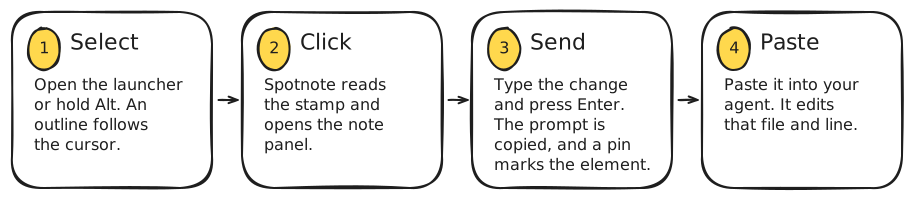
The plugin also adds a script to the page Vite serves, so the client starts without an import in your app.
It draws everything (the launcher, outlines, panel and pins) inside the open shadow root of a single <spotnote-root> element appended to <html>. Your app's CSS doesn't affect it, and its CSS doesn't leak into your app. The element carries data-spotnote-ui, so Spotnote ignores its own UI when it looks for elements under the cursor.
If your end-to-end tests run against your dev server, the stamps and <spotnote-root> are in the DOM there too.
When you click in selection mode, the client:
- finds the element under the cursor that carries a stamp (the nearest stamped ancestor if the exact element has none),
- opens the note panel,
- on send, builds the prompt from the stamp, the element itself, its computed styles, and the owning components of its stamped ancestors.
How a note finds its element
A note is saved with its element's stamp and its position among elements with the same stamp (for repeated elements). To show a pin, the client looks for the element with that stamp at that position.
- Why notes survive reloads and hot updates: the stamp comes back with the element, with no IDs in your code.
- Why a note loses its element when an edit moves the opening tag: the stamp changes, so nothing matches. See Why did a pin disappear after an edit?.
Next
Reference: every option, field and key, for looking things up.